XoT Technology Overview
Introduction
XoT Technology enables precise policy-driven control of network communication. Instead of giving users and devices access to whole networks, encrypted tunnels are created between authenticated users and the specific assets they are authorized to use.
This system is built around the following components:
- The XoT-Lock that when placed in front of an asset, from a single device to multiple subnets, can control access to it. Its primary job is to enforce the access rules defined by administrators, ensuring only authorized traffic can reach what is connected to its protected interface.
- An XoT Client can initiate secure connections. While this is often the desktop software used by an end-user, any XoT-Lock can also function as a client, enabling secure machine-to-machine communication.
- The XoT Management System (XMS) is where administrators define access policies, manage users and assets, and monitor the system. Policies determine precisely who can access what, where they can access it from, when they are allowed, and how they can connect.
- The XoT-Bridge allows access to devices that would not otherwise be accessible due to networking or firewall constraints.
The following sections will explore each of these components, and some others, in greater detail, explaining their specific roles and capabilities within the XoT ecosystem.
Zero-Trust Security Model
XoT Technology implements a zero-trust approach to network access. Rather than trusting users or devices based on their network location, every connection must be explicitly authorized through policy.
Key principles:
- Deny-all by default. No traffic reaches protected assets until an access policy explicitly allows it. Even an enrolled XoT-Lock with a connected client will block all traffic without a matching policy.
- Least privilege. Policies grant access only to the specific protocols, ports, and assets that a user or device needs. A user who needs SSH access to a server does not automatically gain HTTP or RDP access to the same server.
- Continuous authentication. WireGuard tunnel authentication is repeated every 30 seconds to ensure that only valid, authorized connections persist.
- Time-limited access. Access tickets issued by the XMS have a configurable time-to-live (TTL). When tickets expire, access is revoked and must be re-granted by the XMS.
- Mutual authentication. Both the client and the XoT-Lock must verify each other's identity through X.509 certificates before a tunnel can be established.
XoT-Lock
The XoT-Lock protects assets, from a single device to several subnets across multiple VLANs. By placing a XoT-Lock in front of an asset, administrators can enforce access policies defined in the XMS.
XoT Clients (desktop clients or other XoT-Locks) which have policy access then establish encrypted tunnels to the XoT-Lock, ensuring that only authorized traffic reaches the protected asset.
Asset Types
An XoT-Lock can protect different types of assets:
- Device: Protects a single device with a single IP address. The device keeps its original subnet membership and IP address.
- Subnet: Protects one or more entire subnets, potentially spanning multiple VLANs. Supports transparent (proxy) mode where devices get IPs from the external DHCP server, or DHCP server mode where the XoT-Lock assigns IPs on the protected side.
- Remote Asset: Represents a device or network accessible through the XoT-Lock's client capability, enabling machine-to-machine policies.
Networking Capabilities
The XoT-Lock includes a range of built-in networking features:
- Configurable firewall — per-asset and per-device firewall rules with protocol, port, and direction filtering, all managed from the XMS.
- DHCP — DHCP relay and DHCP server mode, with configurable settings and support for multiple devices on the protected side.
- NAT — Static and dynamic NAT for translating addresses between protected and external networks, including inbound source NAT for incoming traffic.
- VLAN support — Protect multiple VLANs behind a single XoT-Lock using tagged networks.
- 802.1x supplicant — Authenticate with network switches that require 802.1x (dot1x) port-based access control.
- Traffic mirroring — Mirror traffic to a monitoring address for integration with network analysis tools.
- SSH access — Administrators can enable SSH access to the XoT-Lock for advanced diagnostics, using public key authentication.
XoT-S1
The XoT-S1 is a compact hardware platform designed specifically for running XoT software. It comes pre-installed and can be deployed within minutes: connect power and network, enroll it into your XMS, and it is ready to be used.
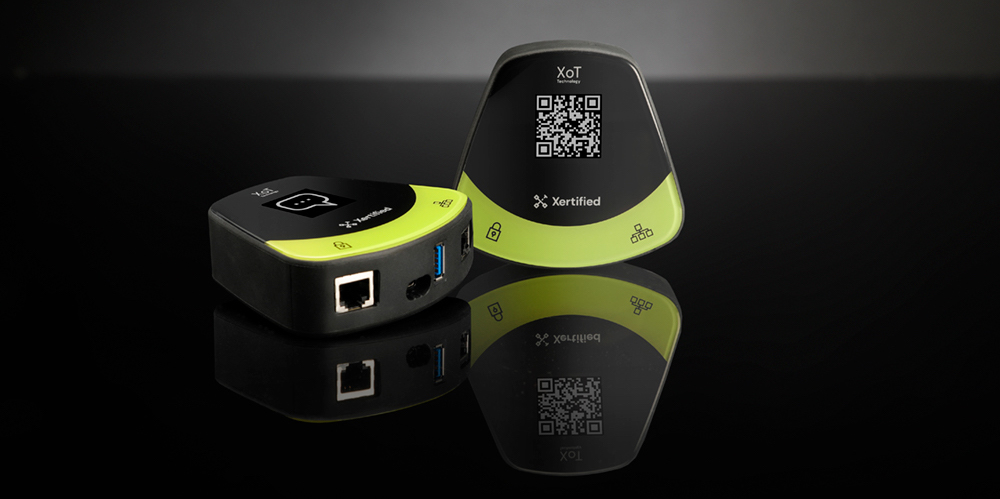
Specifications:
- Dimensions: 92x98x30 mm.
- Weight: 120 g.
- 2x 10/100/1000 MB Ethernet ports, auto-sensing.
- 1x USB-C, only for power source. 5 W normal load / 10 W max load.
- 1x USB-A, for peripherals, deactivated by default.
- Mounting: DIN-rail brackets.
- Network latency: min 3.19, avg 6.27, max 42.8 ms.
- Cold boot time: less than 50 s.
- Hot reboot time: less than 33 s.
- Firmware upgrade time: less than 2:30 min.
- Recommended environment temperature: 0 – 50 °C.
Other Hardware Platforms
The XoT-Lock software can also be installed on any 64-bit x86 or ARM64 system, be it bare metal or virtual machines, providing flexibility for different deployment environments. See the Software XoT Installation Guide for details.
XoT Clients
An XoT Client can authenticate and establish an encrypted connection to an XoT-Lock. XoT Clients are available in several forms to suit different use cases.
Desktop Client
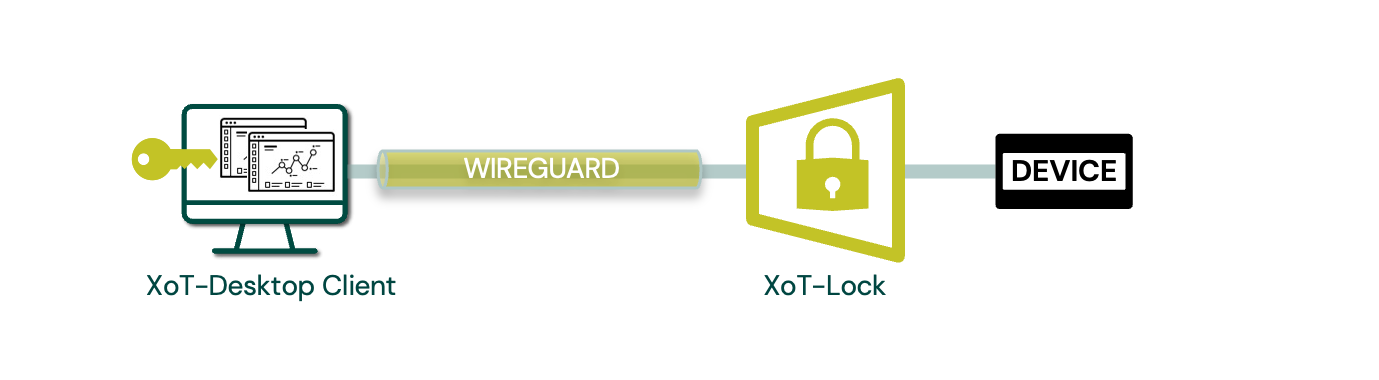
The XoT-Desktop Client is the graphical application designed for end-users. It provides a simple interface where users can see which devices and services they are authorized to access and establishes secure tunnels automatically based on XMS policies. The desktop client is available for Windows, macOS, and Linux.
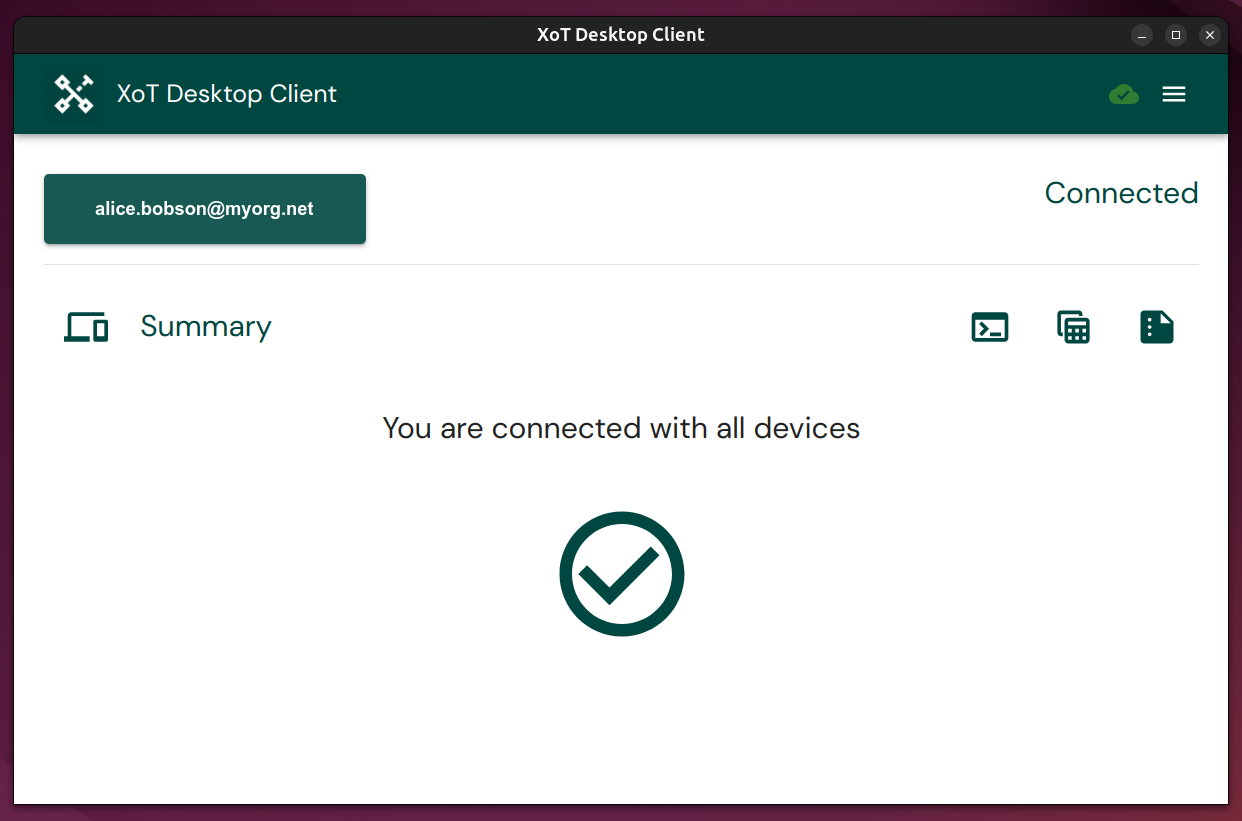
The client consists of several cooperating components:
- The GUI — an Electron-based desktop application that displays connection status, service access links, and diagnostics.
- The engine — a background service that communicates with the XMS via MQTT, manages access tickets, and coordinates connections.
- The daemon — a privileged service that configures WireGuard tunnels, manages network routes, and handles DNS resolution.
- The proxy — handles MQTT communication and hardware token (PKCS#11) integration.
Once configured and started, the client connects to the XMS, receives access tickets, and establishes tunnels to all authorized XoT-Locks. Users can then access protected resources as if they were on the same network, using their standard tools (browsers, SSH clients, RDP, etc.).
The client supports service access via clickable URLs for HTTP/HTTPS, SSH, SFTP, and RDP. It can also run in headless mode as a system service for server-to-server connectivity.
For more details on using the client, see the XoT-Desktop Usage Guide.
Hardware Tokens and Passkeys
For strong authentication, the XoT-Desktop Client supports hardware tokens and passkeys. These provide secure storage of certificates and private keys, and are recommended best practice.
Supported tokens include:
- Yubico YubiKey (via PIV PKCS#11)
- Thales ID-series and Net iD smart cards (via PKCS#11)
- Generic smart cards via OpenSC (PKCS#11)
- Software certificates (PEM files) for environments without hardware tokens
Hardware tokens require PIN entry for authentication. Local key files can also be used, but hardware tokens are preferred for higher security.
Headless Client
For servers and automated environments, the client can run in headless mode without a graphical interface. This provides the same secure connectivity and policy enforcement as the desktop version, making it suitable for background services and machine-to-machine communication. Headless mode runs as a system service (xot-headless) and supports software tokens, NetID, and OpenSC tokens (YubiKey is not supported in headless mode due to PIN prompting requirements).
XoT-Lock Client
Every XoT-Lock includes a built-in client capability. This allows it, while still performing its normal functions, to establish a connection to other locks. This dual role is essential for enabling advanced scenarios such as secure network segmentation or providing access for devices that cannot run client software themselves.
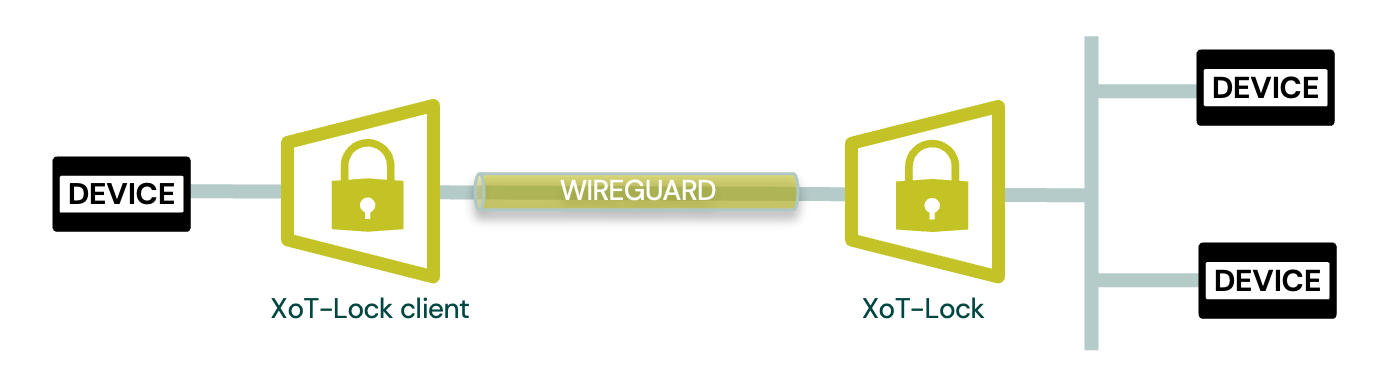
This enables machine-to-machine (M2M) communication without installing any software on the protected devices. For example, a PLC behind one XoT-Lock can communicate with a SCADA server behind another XoT-Lock, with the locks handling all authentication and encryption on their behalf.
XMS
The XoT Management System, usually referred to as XMS, serves as the central command and control panel for the XoT Technology infrastructure. It is the tool used by administrators to configure, manage, monitor, and secure the XoT Technology. The XMS distributes configuration and policy updates, receives telemetry, and provides visibility into system health and activity.
Architecture
The XMS runs as a set of containerized microservices:
- Dashboard — a React-based web interface for administration
- API — the central REST API that serves the dashboard and communicates with XoT devices
- MQTT broker — handles real-time communication with XoT devices and clients (Mosquitto with mTLS)
- Certificate Authority manager — handles X.509 certificate issuance and management, with support for integrated CA or external CAs (Net iD Portal, Cygate)
- Identity provider — Keycloak, providing OIDC/OAuth2 authentication and user federation
- Database — PostgreSQL for persistent storage
- Directory sync — synchronizes users and groups from external identity sources
Administration
Administrators can:
- Manage users and permissions
- Define and edit assets (devices and networks)
- Create and manage access policies
- Monitor system health and status
- View logs and audit trails
- Remotely manage XoT-Locks (reboot, firmware updates, diagnostics)
- Visualize the access topology using the Policy Graph
- Manage X.509 certificates and track certificate expiry
- Upload and distribute firmware updates
- Generate client configuration packages
Access Policies
Creating and managing access policies is designed to be intuitive and accessible even for users without technical experience. Policies are configured by specifying the following:
- Who: User groups or devices allowed access
- What: Target devices or device groups
- Where: Geographical or logical location of assets
- When: Time-based access schedules (always, one-time, or recurring)
- How: Network filters such as protocols, ports, or firewall rules
This approach allows administrators to define precise, fine-grained access without requiring deep technical expertise.
Policies support several source-to-destination combinations:
| Source | Destination | Description |
|---|---|---|
| User Group | Protected Asset | End users accessing servers, devices, or networks through XoT-Desktop or WebAccess |
| Protected Device | Protected Device | Machine-to-machine communication between assets behind different XoT-Locks |
| Protected Device | Unprotected Device | Controlled outbound access from protected networks to external endpoints |
| Unprotected Device | Protected Device | Controlled inbound access from external systems to protected assets |
The Policy Graph provides a visual representation of the access topology, showing how users, user groups, policies, assets, and endpoints relate to each other. This makes it easy to answer "who can access what?" and troubleshoot access issues.
User and Role Management
XMS integrates with external identity providers for user management:
- Keycloak — open-source identity provider, bundled with XMS, supporting federation with multiple sources
- Microsoft Entra ID — enterprise directory synchronization via Microsoft Graph API
- LDAP/LDAPS — directory synchronization from LDAP-compatible sources
Users are organized into groups that are referenced by access policies. Administrators can assign roles with fine-grained permissions:
- Superadmin — unrestricted access to all XMS functions
- Admin — global administrative access (except firmware upload and group sync management)
- Asset Manager — can manage assets, optionally scoped by location and classification
- Policy Manager — can create and manage policies, optionally scoped by location and classification
- Policy Activator — can activate scheduled policies
- Client — can access assets via policies, no administrative privileges
Permissions can be scoped by both location (country, city, address, room) and classification (device type, device group), allowing organizations to delegate administration to specific teams or regions.
Asset Organization
Assets in XMS are organized using classification and location attributes that can be targeted by policies:
- Location — hierarchical: Country, City, Address, Room
- Device Type — high-level category (e.g., server, printer, PLC)
- Device Group — sub-category within a type
This classification system allows policies to target assets broadly (e.g., "all servers in Stockholm") or narrowly (e.g., "database servers in Room 401").
Assets can be discovered automatically by XoT-Locks on the protected network (via DHCP) and appear as Discovered Assets in the XMS for administrators to review and adopt.
Communication
All XoT components communicate with the XMS using the MQTT protocol over TLS with mutual certificate authentication (mTLS). This channel is used for:
- Delivering configuration and policy updates to clients and locks
- Receiving telemetry and status updates
- Distributing access tickets
- Collecting security events and diagnostic data
Connection Flow
When a XoT Client comes online:
- It connects to the XMS via MQTT (mTLS).
- The XMS verifies the client's certificate and issues an access ticket (time-limited, cryptographically signed credential).
- The client sends a UDP access request to the XoT-Lock (or Bridge) using information from the ticket.
- The XoT-Lock verifies the ticket and initiates a WireGuard tunnel with the client.
- Mutual authentication is performed, and the encrypted tunnel is established.
- Authentication is repeated every 30 seconds to ensure ongoing tunnel integrity.
Ticket Lifecycle
Access tickets are the core of the XoT permission system:
- Issuance: The XMS generates tickets based on active policies matching the client's user/group membership.
- Expiry: When a ticket expires, the corresponding tunnel is torn down and the client must obtain a new ticket.
- Revocation: Administrators can revoke access immediately through the XMS.
Note: As long as tickets remain valid, established tunnels continue to function even if the XMS is temporarily unavailable. This ticket-based design provides resilience during XMS maintenance windows or brief outages.
Enrollment
Before an XoT-Lock can be managed, it must be enrolled with the XMS:
- The XoT-Lock obtains an enrollment URL (via QR code on XoT-S1, or CLI command on software XoT).
- An administrator navigates to this URL, logs into the XMS, names the device, and approves the enrollment.
- The XMS issues an X.509 certificate for the device via the configured Certificate Authority.
- The XMS delivers encrypted configuration (including CA certificates and MQTT connection details) to the device.
- The device establishes its MQTT connection and becomes managed.
XoT-Bridge
A XoT-Bridge enables communication when clients and locks are on separate networks and cannot reach each other directly.
The bridge works by relaying encrypted traffic without decryption, allowing secure access across firewalls or NAT boundaries. Since the bridge never decrypts the traffic, it cannot inspect or modify the data — it is a pure relay point that maintains end-to-end encryption between client and lock.
In the default mode of an XoT-Bridge, both clients and locks call in to the Bridge (sometimes referred to as rendezvous mode). For traditional network configurations, the XoT-Bridge can be configured to initiate the connection to XoT-Locks, though this usually requires more extensive firewall configuration.
Bridges are organized into Bridge Groups for redundancy. Multiple bridges in a group provide failover capability — if one bridge becomes unavailable, traffic is automatically routed through another bridge in the same group.
Since the XoT-Bridge is simply a configuration of the XoT software, it can run on the same platforms as a XoT-Lock.
XoT-WebAccess
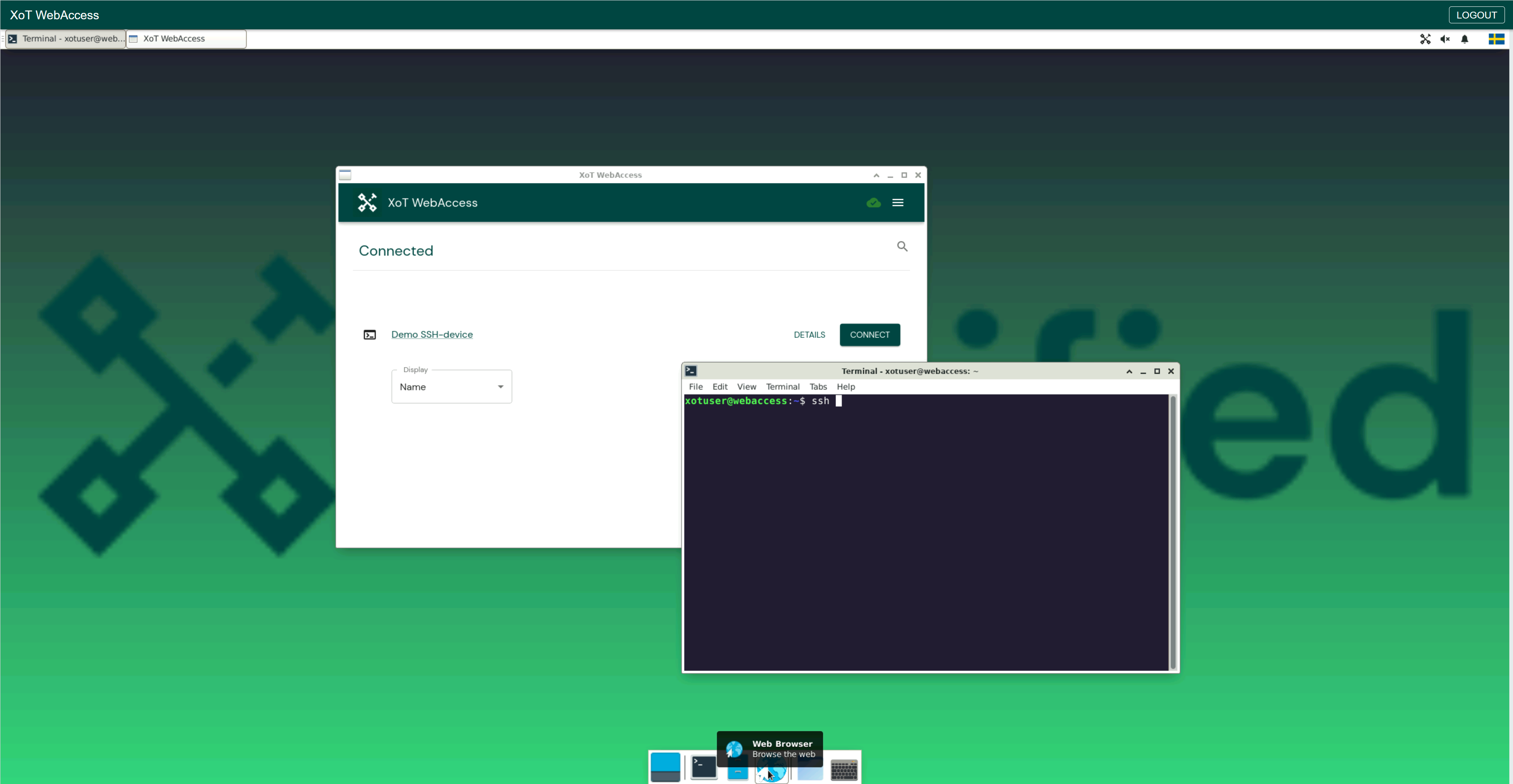
XoT-WebAccess provides a browser-based client for situations where installing software is not possible, for example: contractors, bring-your-own-device scenarios, or restricted workstations.
Use Cases
- Temporary or third-party access
- Secure remote operations in isolated environments
- Jump-host deployments to prevent direct system access
How It Works
- The user logs in via a web browser (authenticated through Keycloak).
- A virtual desktop session is created in an isolated container.
- The session runs the XoT-Desktop Client, applying the user’s policies.
- Built-in tools (browser, SSH, RDP, etc.) are available for work.
- When the user logs out, the session is destroyed, leaving no data behind.
Xertified’s official XoT-WebAccess supports SSH, HTTP(S), and RDP. Additional services can be added as needed.
For details on using WebAccess, see the XoT-WebAccess Usage Guide.
Common Deployment Patterns
XoT Technology supports a wide range of deployment patterns. Here is a summary of the most common ones. For detailed architecture diagrams, see Hide & Protect and Remote Access.
Protecting Internal Assets
The most basic deployment: place an XoT-Lock in front of the assets you want to protect, create policies in the XMS, and users with the XoT-Desktop Client can securely access those assets.
- Single device protection — one XoT-Lock protecting one server or device
- Subnet protection — one XoT-Lock protecting an entire network segment, potentially across multiple VLANs
Machine-to-Machine Communication
Two XoT-Locks can establish encrypted tunnels between each other, allowing the devices behind them to communicate securely without any client software installed on the devices themselves. This is configured through device-to-device policies in the XMS.
Remote Access via Bridge
When users are outside the corporate network, an XoT-Bridge (deployed in a DMZ or cloud) relays encrypted tunnels between remote clients and internal XoT-Locks. The bridge never decrypts the traffic — end-to-end encryption is maintained.
Browser-Based Access
For users who cannot install software, XoT-WebAccess provides a browser-based virtual desktop with the XoT-Desktop Client pre-installed. This is particularly useful for contractors, auditors, or BYOD scenarios.