XoT Technology™ - an Introduction
XoT Connectivity Model
The XoT connectivity model is built around secure communication between an XoT client and an XoT-Lock endpoint. These components authenticate each other using strong cryptography and unique identities derived from a PKI infrastructure. Once mutual authentication is successful, they establish an encrypted communication path using WireGuard.
Traffic is only allowed to flow between explicitly defined IP addresses or networks, as specified by policies managed in the XoT Management System. These policies are based on user groups and their associated XoT endpoints, ensuring precise and secure access control.
In addition to controlling IP addresses and networks, policies can also be configured with firewall filters for IP protocols such as ICMP, TCP, and UDP, providing even more granular control over network communication.
This policy-based approach supports fine-grained network segmentation, enabling organizations to strictly control who or what can access specific resources. As a result, it helps minimize the attack surface and enhances compliance with security and regulatory requirements.
XoT Clients
XoT clients are available for Microsoft Windows, Apple macOS, and Linux. The Windows and Linux versions additionally support a headless mode, enabling the client to operate without a logged-in user — ideal for background services and automated environments.
Furthermore, every XoT-Lock includes a built-in client. This embedded client is useful for machine-to-machine communication, network segmentation, or as a proxy in front of devices where the XoT client cannot be installed or is not allowed.
Hardware Tokens and Passkeys
Desktop clients can import user identities from local files on the user's system. However, for improved security, the use of external hardware tokens or Passkeys is strongly recommended.
XoT-Locks
The XoT-Lock is a software component designed to run on Linux. It can be deployed on any compute platform or hypervisor that supports Linux, including popular environments like VMware ESXi, KVM, Hyper-V, and cloud-based virtual machines in Microsoft Azure or Amazon AWS. It also supports deployment on bare metal servers (BMS) for scenarios requiring direct hardware access or maximum performance.
Xertified additionally offers a dedicated hardware platform for use where appropriate. Any combination of software and hardware deployments is fully supported.
Communication
All XoT components communicate securely with the management system using the MQTT protocol. This channel is used for one-way configuration delivery to endpoints and for receiving telemetry in return.
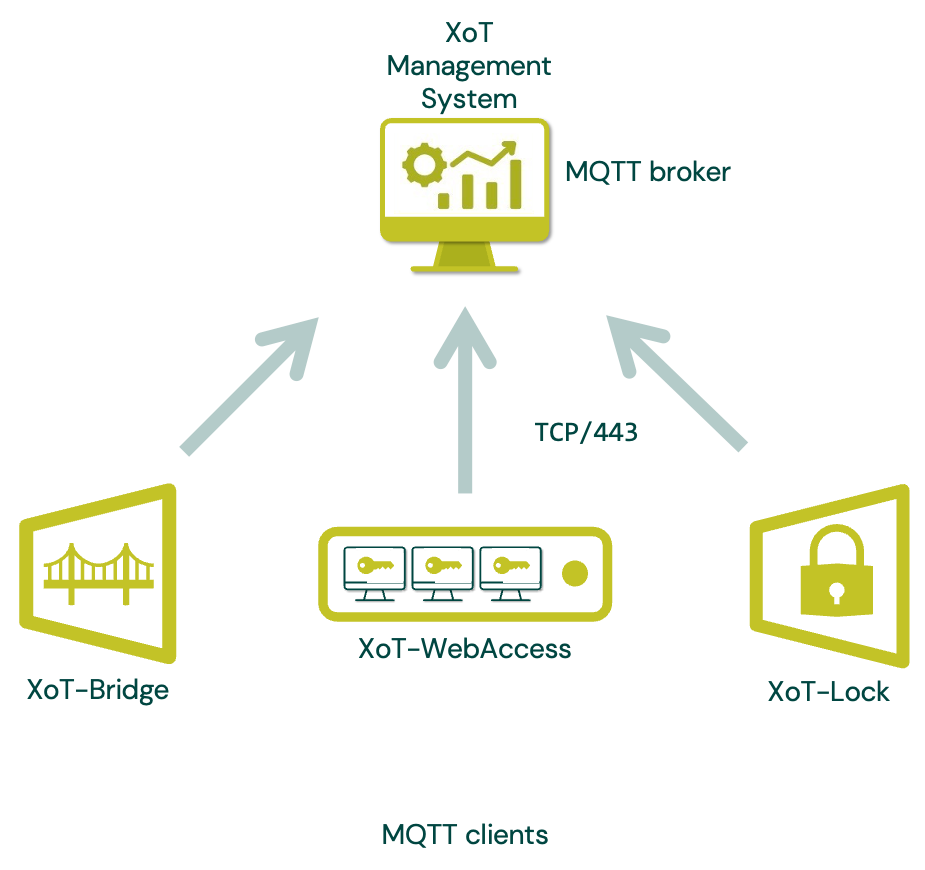 When a client comes online, it connects to the XMS over MQTT. At that point, a Ticket is generated for the client and delivered with a time-to-live (TTL). Using the information in the Ticket, the client attempts to connect to the specified XoT-Locks—either directly or via an XoT-Bridge, depending on the configuration. The first available connection is used.
Once the client reaches an XoT-Lock or an XoT-Bridge, mutual authentication is performed. If successful, a WireGuard tunnel is negotiated and established, allowing secure traffic to flow. Within the tunnel, mutual authentication is repeated every 30 seconds to ensure ongoing integrity.
The client automatically receives updates whenever a policy is changed or the Ticket is nearing expiration. This new information is then relayed to the XoT-Lock.
A connection may be terminated for several reasons, including:
- Ticket TTL expiration
- Ticket revocation
- Failed mutual authentication
- Expired certificates
- Client deactivation
Session setup
Session setup occurs in two different ways.
Regular session setup
In this setup, the XoT client connects directly to the XoT-Lock’s IP address. This approach is typically used when the XoT-Lock is directly reachable—for example, when it’s within the same firewall, in the same security zone, or has a public IP address accessible over the Internet.
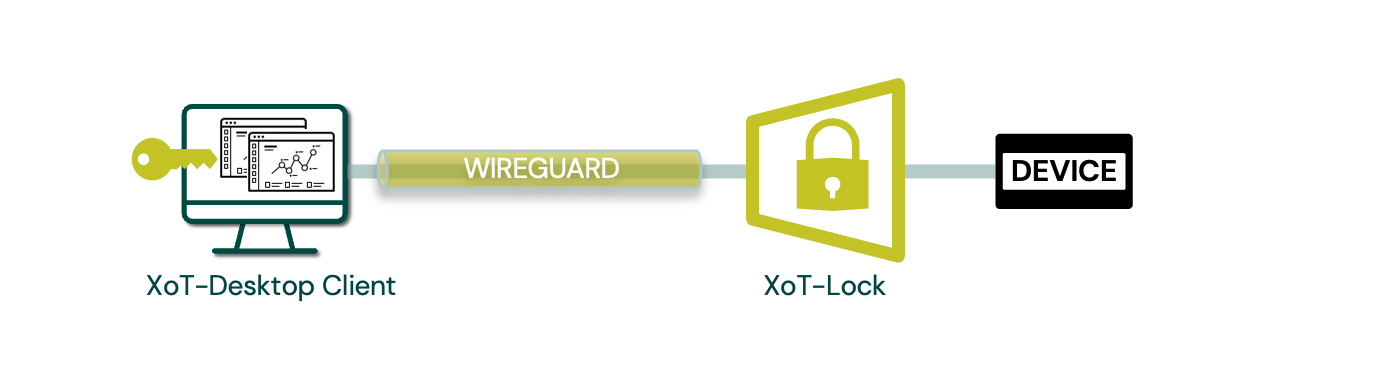 Single Device with PC client
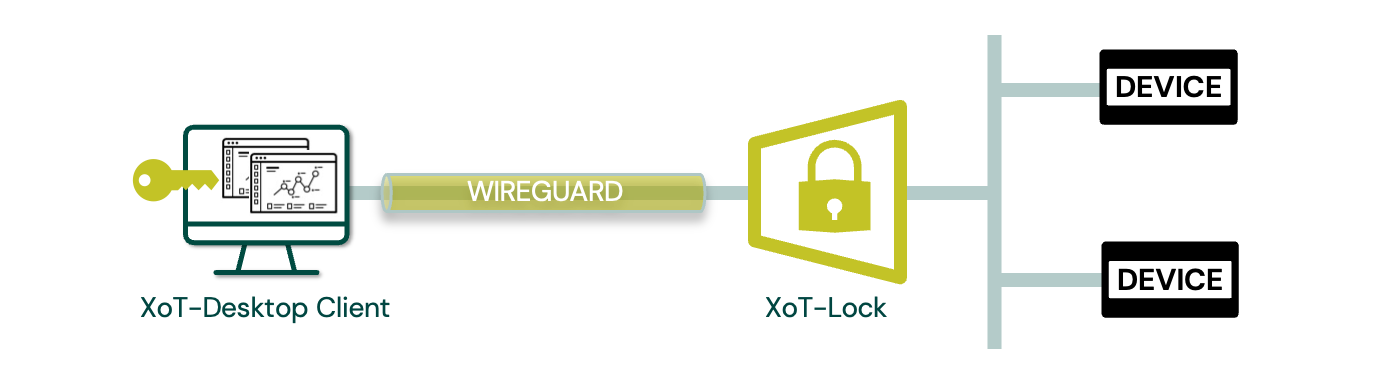 Multiple Devices with PC client
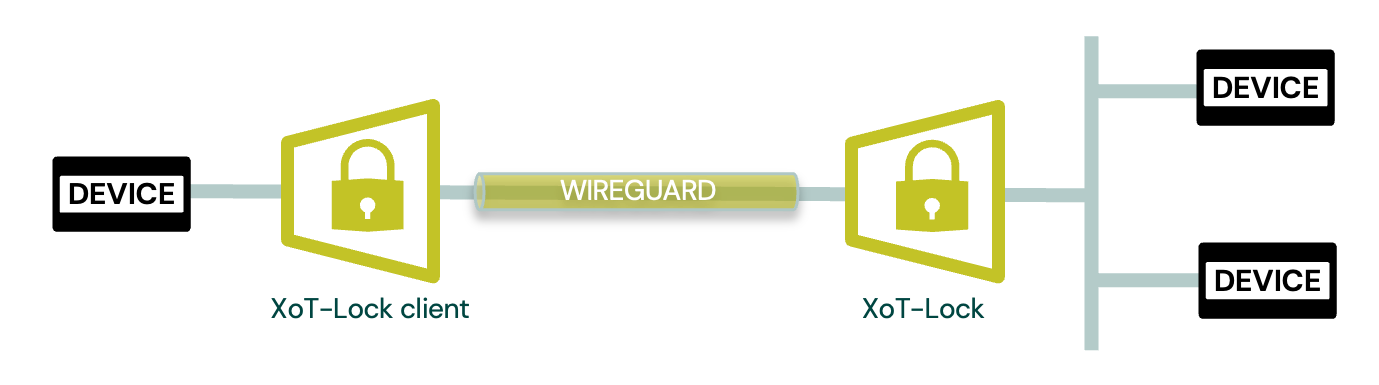 Machine-to-machine - Multiple Devices with XoT-Lock client
Using XoT-Bridge
When the XoT-Lock has an IP address that is not directly reachable by the client—for example, if the client is in a different office and the XoT-Lock is behind one or more firewalls or in a separate security zone—the XoT-Bridge is used.
To enable this, both the client and the XoT-Locks are configured to connect to the XoT-Bridge using an IP address that must be accessible to both parties. Once mutual authentication with the Bridge is successful, it facilitates the establishment of the WireGuard tunnel between the client and the XoT-Lock. The XoT-Bridge does not perform any re-encryption; it simply acts as a relay.
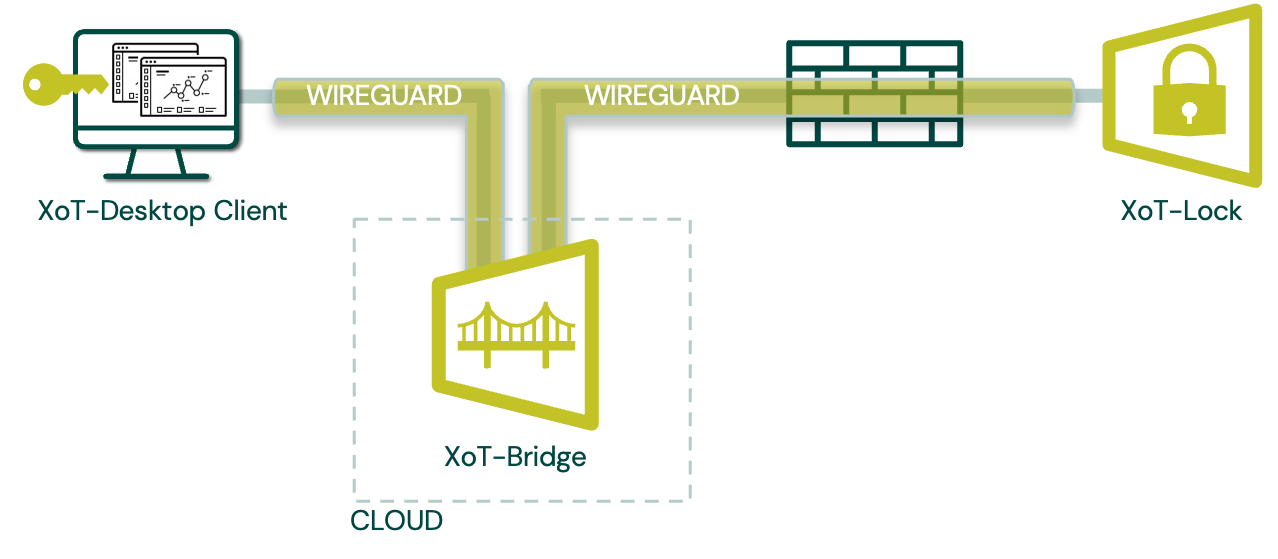 XoT-Bridge deployed in cloud service
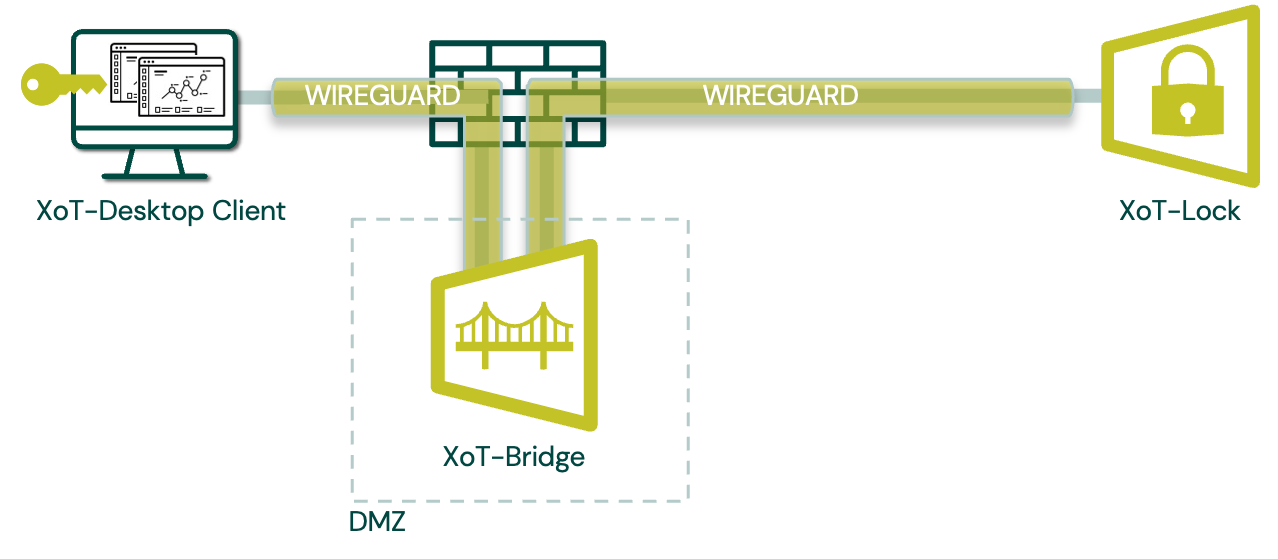 XoT-Bridge deployed in DMZ
Easy Policy Configuration
Creating and managing policies in the XoT Management System is designed to be intuitive and accessible—even for users with minimal technical experience. Policies are configured through a user-friendly graphical interface, following a clear Who, What, Where, When, and How model:
- Who: Select the user groups or devices the policy should apply to.
- What: Specify the device types and groups that the selected users or devices should be allowed to access.
- Where: Define the geographical locations of the devices being accessed.
- When: Apply time-based rules to control when access is allowed (e.g., during business hours).
- How: Configure network-level controls such as ICMP rules and Layer 4 (TCP/UDP) port filters, all without needing to understand advanced networking concepts.
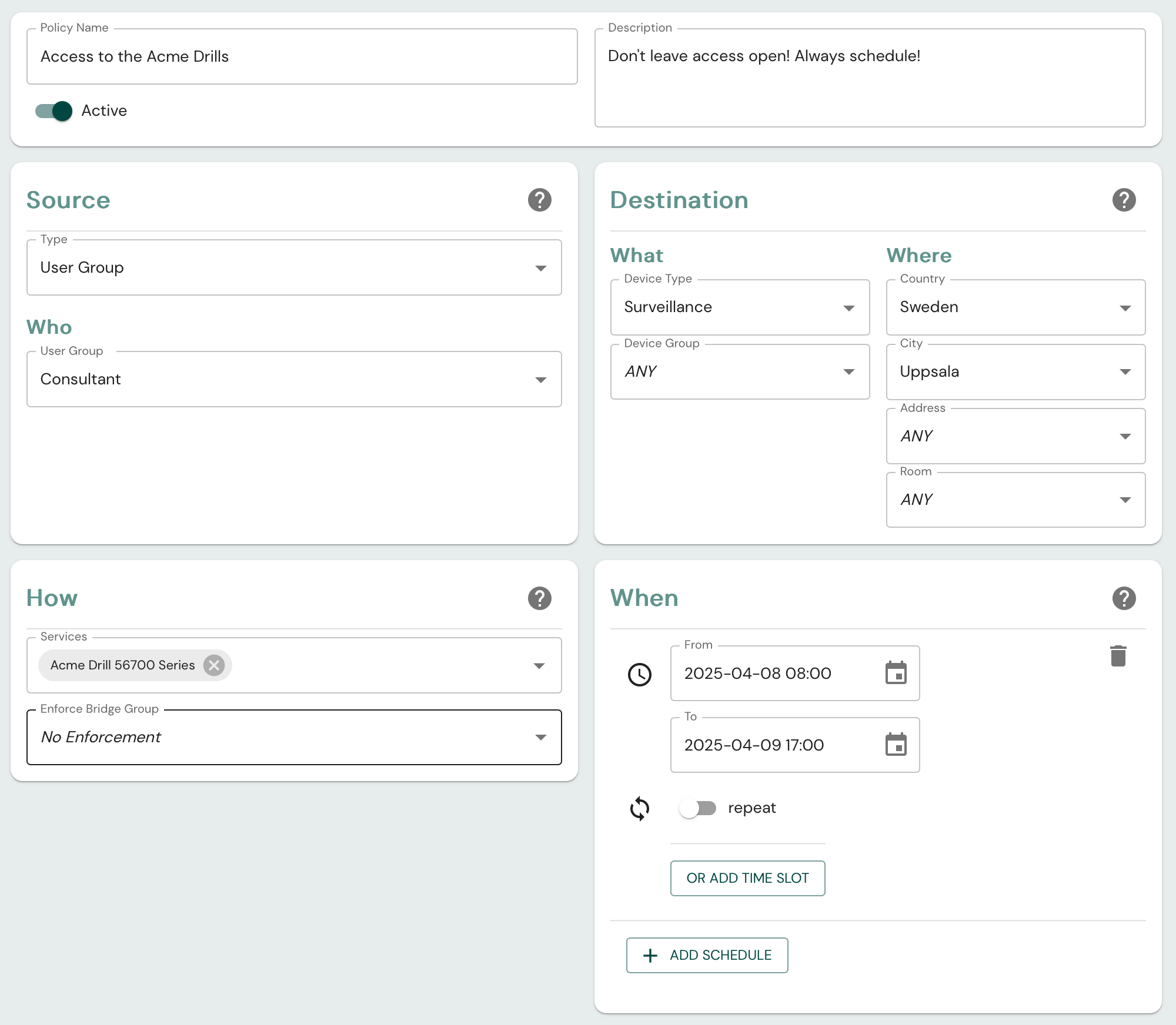 Sample Policy from the XoT Management System
This simple, form-based approach enables administrators to define secure, fine-grained access policies in just a few clicks—no coding or in-depth technical knowledge required.
The XoT Management System
The XMS is a mandatory component responsible for:
- Setting user group policies
- Lifecycle management of the XoT-S1
- Logging
- Monitoring
To operate properly, the XMS must communicate with the following external services:
- A user database
- An Identity Provider (IdP)
- A Certificate Authority (CA)
Although the XMS comes with built-in versions of these systems, production environments typically integrate with external solutions. The XMS supports connections to a range of popular third-party systems.
For more information, please contact a Xertified representative.
XMS Redundancy and Ticket TTL
The Tickets issued by the XMS to XoT clients include a time-to-live (TTL). As long as the Tickets remain valid, the XMS does not play a critical role in maintaining already configured and established traffic paths.
Because of this, a regular backup of the XMS and the ability to restore it within 72 hours is considered sufficient from a redundancy perspective.
XoT-WebAccess: Secure Remote Access Without Local Installation
In scenarios where installing the XoT client software on a user's device is not possible or permitted—such as in contractor environments, BYOD setups, or highly restricted workstations—XoT-WebAccess provides a secure, clientless class="dark-mode-light-bg" alternative.
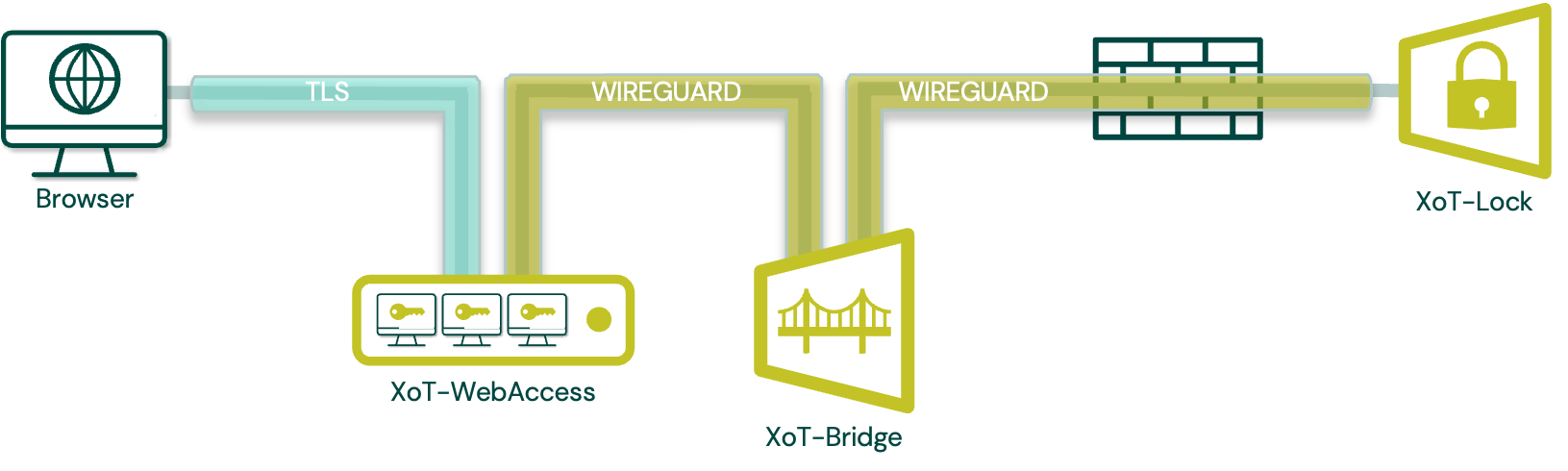 Sample with XoT-Bridge and XoT-WebAccess deployed in cloud service
How It Works
XoT-WebAccess functions as a browser-based jump host (bastion) and can be deployed in any location accessible by end users. It enables secure remote access via a virtual desktop environment, with no need to install local software.
- Users connect via a standard web browser and authenticate through the XoT-WebAccess portal.
- A virtual desktop is dynamically spawned for the session.
- This environment includes the XoT-Desktop Client, which enforces the same access policies defined in the XMS.
- The virtual desktop operates under the same Who, What, Where, When, and How policy model as a locally installed client.
- Upon logout or session timeout, the virtual desktop is completely destroyed, ensuring no residual data is left behind.
Supported Protocols
XoT-WebAccess supports remote access to systems over the following common protocols:
- SSH
- HTTP
- HTTPS
- RDP
- Telnet
This allows users to securely connect to a wide variety of systems and services without compromising endpoint integrity.
Use Cases
- Third-party or temporary access where client installation is not possible
- Secure remote operations through isolated, ephemeral environments
- Jump-host deployments to prevent direct access to protected systems
XoT-WebAccess combines flexibility with strong policy enforcement and identity assurance—ideal for secure, controlled access in modern IT environments.